Instagram Transcript Generator: What Stays in Your Browser?
Leave Optional usage analytics unchecked if you do not want the site's analytics tag enabled, then select your saved file, choose its language and generate the transcript. The inspected file path passes decoded audio to this page's worker; model downloads and optional page analytics are separate paths. Review the words before sharing, and do not confuse local transcription with a page that makes no network requests.
A file-only Instagram transcript generator can process a recording on the device while still fetching its own software. The important distinction is the data in each path, not whether the page ever shows network activity. This note reviews the currently published application code and reports a controlled local script experiment. It is not a browser traffic capture or a certification of every dependency.
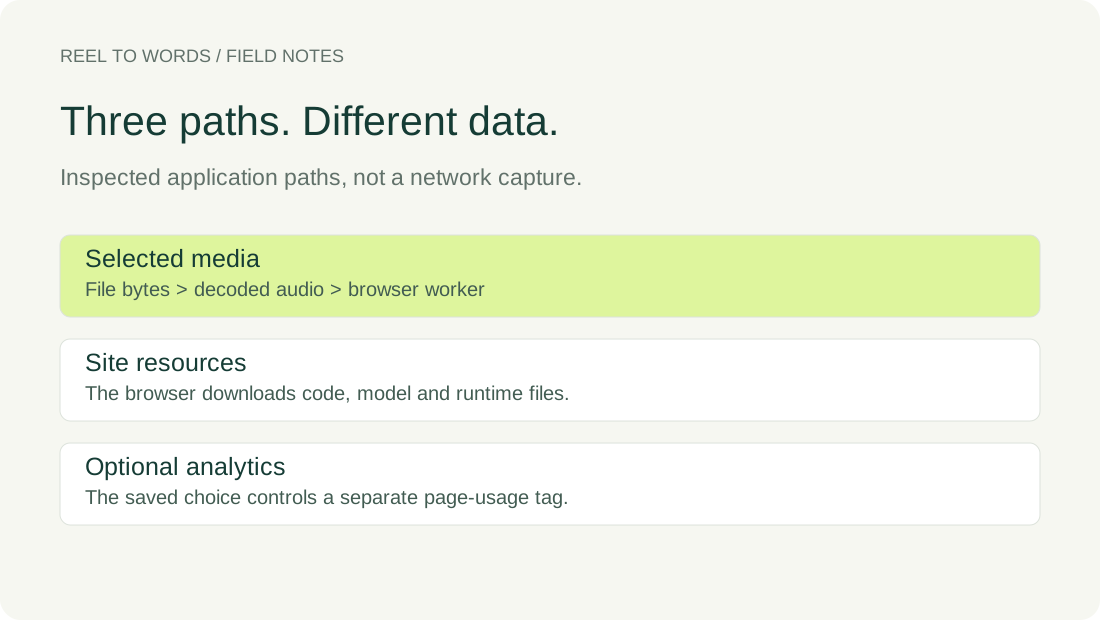
Follow the selected file separately from the model
On November 8, 2026, we downloaded the public application, worker and analytics scripts and compared their bytes with the delivery bundle. The source record below retains their hashes and exact line references. We inspected the submit, decode, worker-message, copy and download paths rather than treating the footer statement as the investigation.
In app.js, the decode function reads the selected file with file.arrayBuffer() and passes those bytes to the audio decoder. The engine function transfers the resulting audio buffer through worker.postMessage to the module worker. That message is a handoff between this application's browser contexts, not a file-upload request in this code path. The submit handler receives recognition output and places text in the result box.
In transcribe-worker.js, remote model loading is disabled. The model and runtime paths resolve to this site's own directories. Those resources still have to be delivered to the browser; downloading a speech model is different from sending the selected recording to a transcription endpoint. We did not test a disconnected browser, and a source setting about the library's cache does not prove that ordinary browser caching is absent.
The copy handler writes the current transcript to the clipboard. The download handler builds a text Blob and an object URL for the saved file. These inspected handlers do not call the optional analytics script with the transcript or original filename. This is a review of the published application paths, not a claim about browser extensions, a compromised device or arbitrary future code.
What the consent script did in our controlled check
We also executed the unmodified public analytics.js in a local JavaScript harness with synthetic document, storage and cookie controls. No Google tag was executed and no recording was supplied. The harness recorded script insertion, queued configuration, the disable flag and storage writes. It did not observe real browser requests or collect visitor statistics.
| Controlled starting condition | Action | Observed result |
|---|---|---|
| No saved choice | Initialize | No analytics tag appended; disabled |
| Saved no | Initialize | No analytics tag appended; disabled |
| Saved yes | Initialize | One tag appended; enabled |
| Storage read throws | Initialize | No tag appended; disabled |
| No saved choice | On, off, on | One tag total; final flag enabled |
| Saved yes | Turn off | Existing tag retained; disable flag set |
| Storage unavailable | Turn on | Tag appended; choice not written to storage |
The distinction after turning off matters. In the saved-yes control, the script had already appended a tag before the change. Turning the choice off set the disable flag and attempted to expire accessible analytics cookies; it did not remove the existing script element or undo earlier activity. A tag count alone would therefore misdescribe the current choice. The raw record keeps both the count and the flag.
The script looked up only the analytics-choice and analytics-state elements in these runs. It queued page-view configuration when enabled, without reading the file input or transcript box. That observation supports the separation in this specific script. Because the harness never ran the external tag, it cannot establish the final network payload of that tag or the behavior of a real browser under every condition.
Source hashes and line referencesActual controlled-run recordReproduce the script experiment
To reproduce this check, save the current analytics.js beside the supplied harness and run node analytics-choice-check.cjs. The harness uses synthetic cookie strings, not anyone's real cookies. Compare the saved source hash first: results for a changed script should be recorded as a new investigation rather than silently attributed to this one.
Keep the scope of the choice clear
Use the footer checkbox to control optional usage analytics. A previously saved affirmative choice can enable it on a later visit; an unchecked box is not a promise that all website requests stop. Pages, styles, runtime and model resources still come from the host. The site's privacy explanation separately describes website delivery and optional measurement.
For confidential material, decide whether the published processing path and your device meet your requirements before selecting the recording. This investigation does not grant permission to process someone else's media, certify a security standard or prove offline operation. Turning a checkbox off also does not retrieve information already received by an external service.
Questions before selecting a recording
Does enabling usage analytics enable transcription?
No. The inspected analytics script controls its tag and footer choice; the file submit handler invokes the local speech worker separately. The analytics choice is not a transcription setting.
Does a model download mean my recording was uploaded?
Not by itself. The configured model path supplies program resources to the browser. Check what a request carries before treating it as evidence of media transfer; this investigation is a source review, not a captured-request analysis.
Does turning analytics off erase previous measurements?
No. The current code sets a disable flag and attempts accessible cookie cleanup. This is not retroactive deletion of information already received elsewhere.
Keep three separate questions in view: where the selected media is processed, which resources the page needs, and whether optional measurement is enabled. This source record answers those for the inspected release within its stated limits; it does not replace checking the version and device you actually use.